graph LR
  A[Client] --> B[Guard relay]
  B --> C[Middle relay]
  C --> D[Exit relay]
  D --> E[Destination website]
👨🏻💻 Cybersecurity
Blue Team: SysAdmin
Pablo Fraile Alonso
Red Team
How we as read team hackers, can attack our machine.
Reverse engineering.
TODO: Here explain ghidra, reverse engineer some binaries.
Binary Explotation
TODO: Explain how ELF works, yara yara yara.
Other reverse-engineering techniques.
We did the medium one: binaries, there are other ones that are easy (such as reverse-engineering java apps, python (which as interpreter, should make the code available, etc). And other ones that are harder (firmware such as the IME or BIOS, etc).
“Cable” Network scanning
- MacChanger
- ARP
Scope → discover hosts → enumerate ports/services → investigate each exposed service → identify plausible vulnerabilities/misconfigurations → validate them safely → once authorized access exists, enumerate the host → assess privilege boundaries
nmap, etc, etc.
Identify Host Services
- Nmap
Identify CVE’s for this services
PWN them
Wordpress Detection
- wpscan
Web Security
See the OWASP guide, it is great, here in this slides we’ll only show the tools.
https://owasp.org/www-project-web-security-testing-guide/
https://release-assets.githubusercontent.com/github-production-release-asset/91277330/87c4c000-357b-11eb-8c88-e5664025b5bc?sp=r&sv=2018-11-09&sr=b&spr=https&se=2026-08-27T13%3A25%3A43Z&rscd=attachment%3B+filename%3Dwstg-v4.2.pdf&rsct=application%2Foctet-stream&skoid=96c2d410-5711-43a1-aedd-ab1947aa7ab0&sktid=398a6654-997b-47e9-b12b-9515b896b4de&skt=2026-08-27T12%3A24%3A52Z&ske=2026-08-27T13%3A25%3A43Z&sks=b&skv=2018-11-09&sig=9bW3D3aHuNRdTgMfjb0QBG1DTQ%2B7JKL%2F3uYtxKD6S5U%3D&jwt=eyJ0eXAiOiJKV1QiLCJhbGciOiJIUzI1NiJ9.eyJpc3MiOiJnaXRodWIuY29tIiwiYXVkIjoicmVsZWFzZS1hc3NldHMuZ2l0aHVidXNlcmNvbnRlbnQuY29tIiwia2V5Ijoia2V5MSIsImV4cCI6MTc4NzgzNTA3OCwibmJmIjoxNzg3ODM0Nzc4LCJwYXRoIjoicmVsZWFzZWFzc2V0cHJvZHVjdGlvbi5ibG9iLmNvcmUud2luZG93cy5uZXQifQ.e42mFUTCM6NeXlY7GGduyLwFCVjU8iCCnDRfWNJp2hk&response-content-disposition=attachment%3B%20filename%3Dwstg-v4.2.pdf&response-content-type=application%2Foctet-stream
(Web-Security): Burpsuite
- Acts as a proxy for network requests
(Web-Security): Zap
Anonymous Internet
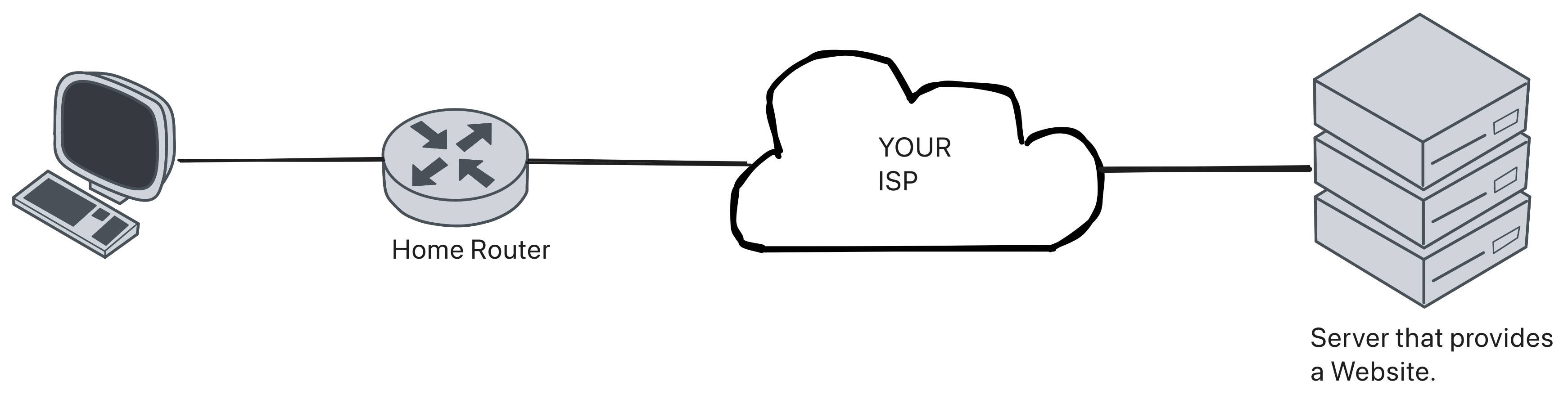
The “normal” way.
- Your ISP sees all your traffic.
VPN?
- Use a VPN as a mitm between the client and the server.
- Not anonymous for the vpn server.

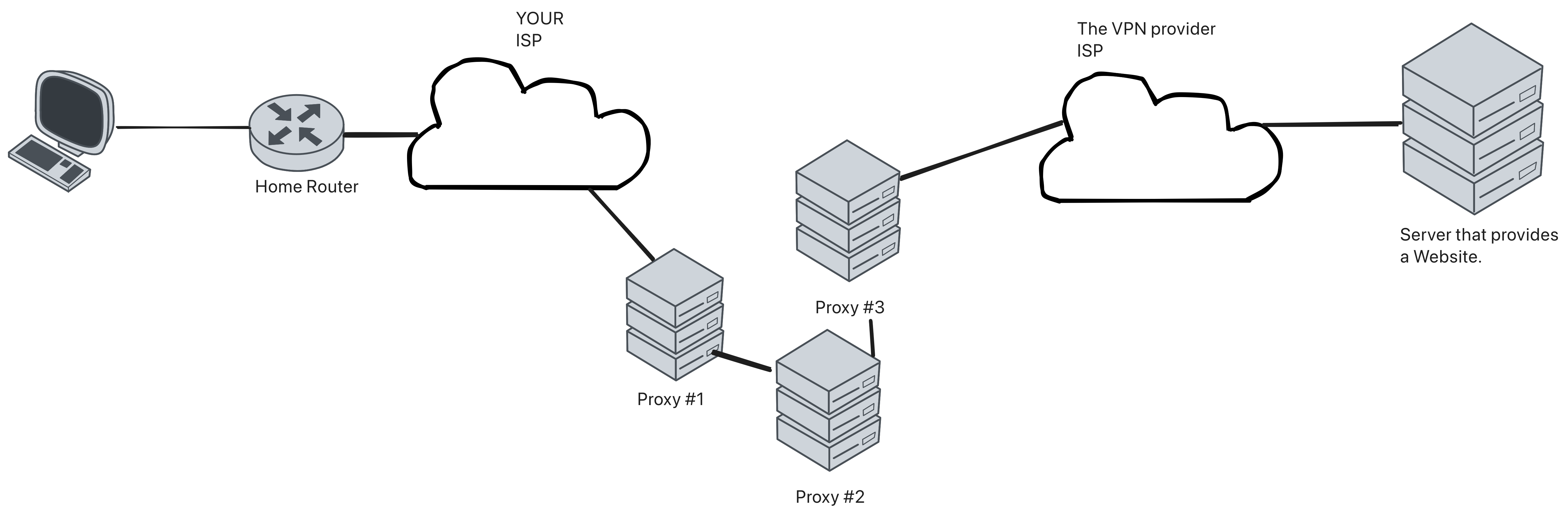
Proxy-Chain?
- Use socksproxy for having a chain of servers until it reaches the server.
- Not anonymous for the servers that acts as a proxy
The real solution: TOR
- TOR allows us to search the web anonymously, with no servers knowing what we’re visiting1.
- Also, it has a really cool solution for having anonymous services, called: “Hidden Services”.
How does tor work?
Tor wraps a message in multiple encryption layers, sends it through several relays, and each relay removes only the layer intended for it.
Each relay knows only its immediate neighbor. The packet looks more or less like this:
┌────────────────────────────────────────────────────────┐
│  TLS LINK LAYER (from client to guard)                 │
│  Visible to ISP: From [Your IP] to [Guard Relay IP]    │
│  ────────────────────────────────────────────────────  │
│  ┌──────────────────────────────────────────────────┐  │
│  │  GUARD LAYER (Outer Onion Layer)                 │  │
│  │  Visible to Guard: "Send this to Middle Node"    │  │
│  │  ────────────────────────────────────────────────│  │
│  │  ┌─────────────────────────────────────────────┐ │  │
│  │  │  MIDDLE LAYER (Middle Onion Layer)          │ │  │
│  │  │  Visible to Middle: "Send this to Exit Node"│ │  │
│  │  │  ────────────────────────────────────────   │ │  │
│  │  │  ┌────────────────────────────────────────┐ │ │  │
│  │  │  │  EXIT LAYER (Inner Onion Layer)        │ │ │  │
│  │  │  │  Visible to Exit: "GET /index.html"    │ │ │  │
│  │  │  └────────────────────────────────────────┘ │ │  │
│  │  └─────────────────────────────────────────────┘ │  │
│  └──────────────────────────────────────────────────┘  │
└────────────────────────────────────────────────────────┘
The three-hop circuit
A typical Tor client builds a circuit with three roles.
| Relay | Sees sender? | Sees destination? | Main role |
|---|---|---|---|
| Guard / entry | Yes | No | First hop into Tor |
| Middle | No | No | Separates guard from exit |
| Exit | No | Yes | Connects to normal internet destinations |
The design avoids giving any single relay both the user’s IP address and the final destination.
Building a circuit
graph TD
  A[1. Client downloads network consensus] --> B[2. Client chooses relays]
  B --> C[3. Client performs key agreement with guard]
  C --> D[4. Client extends circuit to middle]
  D --> E[5. Client extends circuit to exit]
  E --> F[6. Client opens streams over circuit]
Directory authorities and consensus
Tor clients need to know which relays exist and what capabilities they advertise.
Specialized directory authorities vote on relay information and produce a signed network consensus. The consensus gives clients a shared view of the Tor network.12
graph LR
  A[Relays publish descriptors] --> B[Directory authorities vote]
  B --> C[Signed consensus]
  C --> D[Clients choose relays]
Why guards matter
The first relay is called a guard or entry guard.
Rather than choosing a totally new first hop every time, Tor clients use a small set of guards for a period of time. This reduces the chance that, over many circuits, a malicious relay eventually becomes the first hop.
Security tradeoff:
- Fewer guards reduce exposure to many possible malicious entries.
- But a compromised guard is very important because it sees the user’s IP address.
- We wanted to deploy a Tor entry guard node at UdL, but the cybersecurity department did not grant us permission.
What an exit relay is
An exit relay is the last Tor relay before traffic reaches a normal internet destination.
Exit relays can see destination metadata and may see unencrypted content if the user connects to a non-HTTPS service.
This is why Tor does not remove the need for end-to-end encryption (if you’re using the “normal” internet, not applicable for hidden-services).
graph LR
  C[Client] --> G[Guard]
  G --> M[Middle]
  M --> E[Exit relay]
  E --> W[example.com]
Bridges: getting to Tor when Tor is blocked
Some networks block public Tor relays.
Bridges are Tor relays that are not listed in the public relay consensus in the same way as normal relays. They help users connect when public Tor access is blocked.
graph LR
  U[User in censored network] --> B[Bridge]
  B --> G[Tor guard]
  G --> M[Middle]
  M --> X[Exit]
Bridges help with censorship resistance, not invisibility.
Tor Browser’s role
Tor Browser is more than “just a browser”.
It also tries to reduce browser-level tracking and fingerprinting by using consistent defaults, privacy protections, and isolation behavior.
Examples of browser-level risks:
- Cookies and login sessions
- Canvas, font, and screen-size fingerprinting
- Downloaded documents opening outside Tor Browser
- Browser extensions leaking identity
Network anonymity can fail if the browser leaks identifying information.
Tor Hidden services
An onion service is a service reached entirely through Tor (does not use the “normal” internet)
flowchart LR
  C["Client"] --> CT["Tor circuit"]
  CT --> R["Rendezvous point"]
  R --> ST["Tor circuit"]
  ST --> S["Onion service"]
Unlike normal Tor browsing:
- There is no exit relay.
- The client does not learn the service’s IP address.
- The service does not learn the client’s IP address.
- The addresses have to be
.onion, which identify a cryptographic identity.
A .onion address is a public-key identity
For a v3 onion service, the address contains the service’s Ed25519 public identity key.
- So conceptually, going to a
.onionaddress means: “I want the service owning this public key” - This makes onion addresses self-authenticating: the client can cryptographically verify that it reached the service corresponding to that address.
- There is no normal DNS lookup mapping the
.onionname to a server IP (we’ll see how it works using HSDirs)
What is stored in Tor’s distributed directory? (HSDirs)
Tor does not store:
Instead, special relays called Hidden Service Directories (HSDirs) store an encrypted, signed onion-service descriptor.
A descriptor contains information needed to contact the service, especially:
- Its current introduction points
- Keys associated with those introduction points
- Authentication and protocol information
flowchart LR
  S["Onion service"] -->|descriptor| H1["HSDir #3253"]
  S -->|descriptor| H2["HSDir #2356"]
  S -->|descriptor| H3["HSDir #8523"]
The real IP address of the onion service is not published.
How does the client know which HSDirs to ask?
The directory behaves like a DHT-like distributed hash ring.
For each time period (24 hours default):
flowchart TD
  A[".onion identity key"] --> B["Derive blinded key"]
  T["Current time period"] --> B
  B --> D["Descriptor index"]
  SR["Shared random value "] --> D
  D --> H["Responsible HSDirs"]
The shared random value is available on the concensus, and changes each 24 hours.
Important idea:
- The service and client can independently calculate which HSDirs are responsible.
- The responsible HSDirs change over time.
- The service uses a periodically changing blinded key, rather than publishing directly under its long-term identity key.
This makes descriptors harder to target permanently and avoids exposing the long-term service identity directly as the directory index.
Step 1) Before clients connect: the service publishes itself
The onion service first prepares several introduction points.
flowchart LR
  S["Onion service"] --> G1["Guard"]
  G1 --> M1["Middle"]
  M1 --> I1["Intro point 1"]

  S --> G2["Guard"]
  G2 --> M2["Middle"]
  M2 --> I2["Intro point 2"]
Then it:
- Builds Tor circuits to introduction points.
- Registers those circuits using
ESTABLISH_INTRO. - Creates a descriptor listing the introduction points and their keys.
- Uploads the descriptor anonymously to the responsible HSDirs.
The introduction-point circuits remain available to receive connection requests.
Step 2) Client discovery: from .onion to introduction points
When the user enters an onion address:
flowchart TD
  A["1. Read .onion"] --> B["2. Extract identity key"]
  B --> C["3. Derive blinded key"]
  C --> D["4. Find HSDirs"]
  D --> E["5. Download descriptor"]
  E --> F["6. Verify descriptor"]
  F --> G["7. Learn intro points"]
- The descriptor gives the client a way to contact the service without revealing where the server is located.
- The HSDir is therefore just a discovery mechanism for knowing the Introduction Points of the Server.
Step 3) the client creates a rendezvous point
Before contacting the onion service, the client chooses a Tor relay to act as a rendezvous point (RP).
flowchart LR
  C["Client"] --> G["Guard"]
  G --> M["Middle"]
  M --> R["Rendezvous point"]
- The client sends a Cell packet with:
ESTABLISH_RENDEZVOUS + random rendezvous cookie. - The rendezvous point remembers:
cookie => associated with this client circuit - The Rendezvous Point still does not know the client’s real IP because the client reached it through a Tor circuit.
Step 4) the client introduces itself to the service
The client chooses one introduction point from the descriptor and builds another Tor circuit to it.
flowchart LR
  C["Client"] --> CG["Guard"]
  CG --> CM["Middle"]
  CM --> I["Intro point"]

  S["Onion service"] --> SG["Guard"]
  SG --> SM["Middle"]
  SM --> I
- The client sends an
INTRODUCE1request containing, in encrypted/authenticated form, the information the service needs to reach the chosen rendezvous point. - The introduction point forwards it to the service as
INTRODUCE2.
The introduction point only acts as a mechanism for introduction. It is not used for the final data connection.
Step 5) the service joins the rendezvous
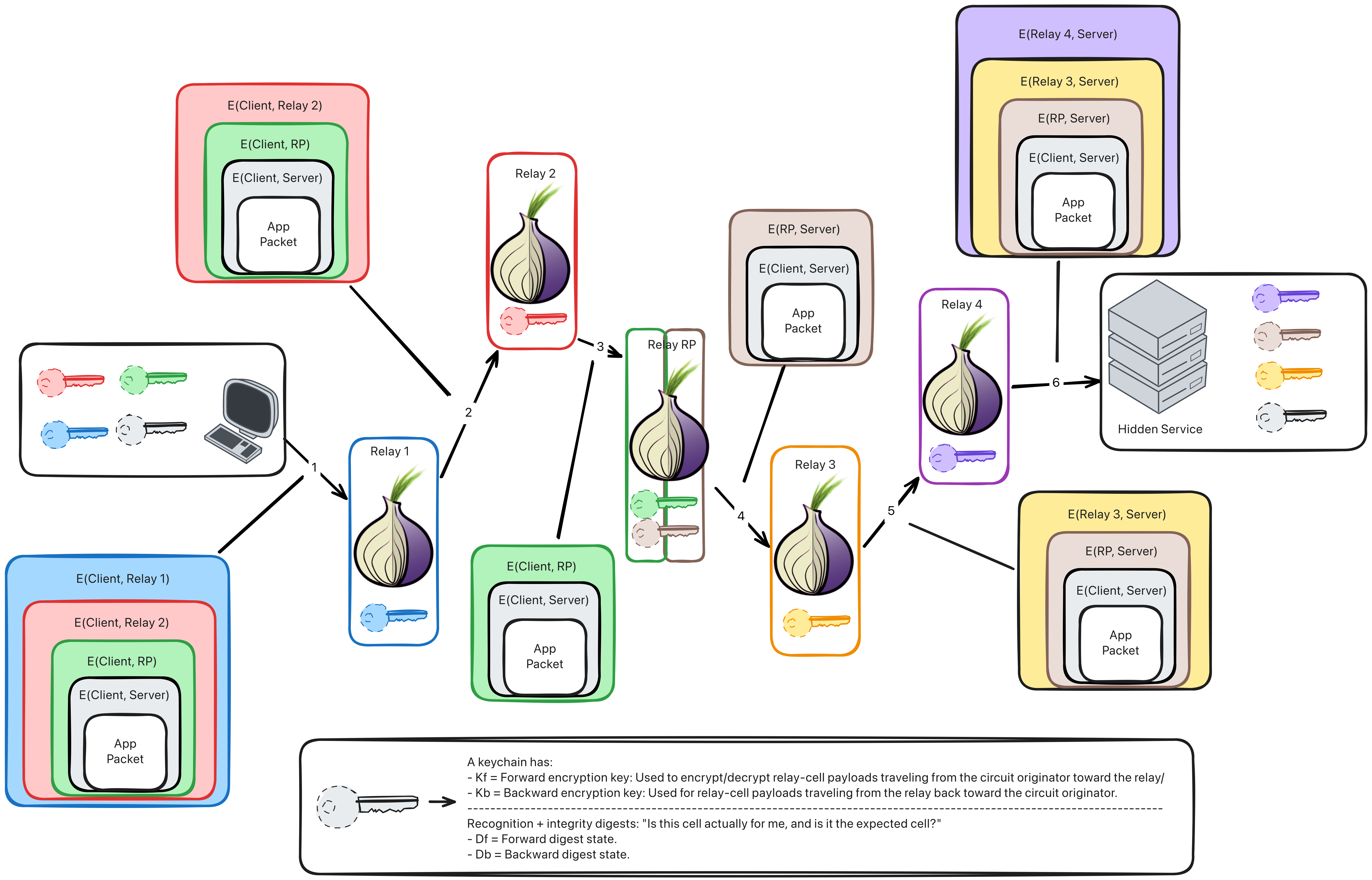
After receiving the introduction request, the onion service builds its own Tor circuit to the rendezvous point.
flowchart LR
  C["Client"] --> CG["Guard C"]
  CG --> CM["Middle C"]
  CM --> R["Rendezvous point"]

  S["Onion service"] --> SG["Guard S"]
  SG --> SM["Middle S"]
  SM --> R
- The service sends a
RENDEZVOUS1message containing the rendezvous cookie and handshake information. - The Rendezvous Point (RP) matches the cookie with the waiting client circuit and joins the two circuits.
- The RP forwards a RENDEZVOUS2 packaget to the client that contains the HANDSHAKE_INFO taken from RENDEZVOUS1 (the cookie is not forwarded to the client).
- The client then verifies the cryptographic handshake and derives shared end-to-end keys with the onion service.
Step 6) The final onion-service connection
Once rendezvous succeeds, the introduction point and HSDirs are no longer in the data path.
flowchart LR
  C["Client"]
  C --> CG["Client guard"]
  CG --> CM["Client middle"]
  CM --> R["Rendezvous point"]
  R --> SM["Service middle"]
  SM --> SG["Service guard"]
  SG --> S["Onion service"]
Application traffic is protected with keys known to the client and onion service, while each side also retains the normal Tor circuit encryption on its half of the path.
The rendezvous point forwards Tor relay cells between the two circuits but does not terminate the end-to-end onion-service encryption.
Onion-service protocol: complete flow
sequenceDiagram
  participant S as Service
  participant I as Intro Point
  participant H as HSDir
  participant C as Client
  participant R as Rendezvous

  S->>I: ESTABLISH_INTRO
  S->>H: Publish descriptor

  C->>H: Fetch descriptor
  H-->>C: Intro points + keys

  C->>R: ESTABLISH_RENDEZVOUS
  R-->>C: RENDEZVOUS_ESTABLISHED

  C->>I: INTRODUCE1(RP, cookie)
  I->>S: INTRODUCE2
  I-->>C: INTRODUCE_ACK

  S->>R: RENDEZVOUS1(cookie)
  R-->>C: RENDEZVOUS2

  Note over C,S: End-to-end traffic flows via RP
Core idea: the .onion address identifies the service cryptographically, HSDirs tell the client how to introduce itself, and the rendezvous point connects two anonymous Tor circuits without learning either endpoint’s real address.
Key hierarchy (simplified)
Some questions before playing with tor
- If you were a china government agent, how would you block tor connections?
- Do we need a public server to host a tor hidden service?
- And for a tor relay/node?
- Do you think there’s a “google” alternative on the tor network?
Now, let’s play with tor.
- Connect to the Tor network using Tor Browser.
- Access the webpage through its
.onionaddress. - Check your public IP address and inspect the Tor circuit created by Tor Browser.
- Create and configure a Tor hidden service (onion service).
- Configure an onion service to provide SSH access to your device.
- Use
torsocksto route an application’s traffic through the Tor network, for example when connecting to a friend’s laptop.
Wireless hacking.
NIC Promiscuous mode
In computer networking, promiscuous mode is a mode for a wired network interface controller (NIC) or wireless network interface controller (WNIC) that causes the controller to pass all traffic it receives to the central processing unit (CPU) rather than passing only the frames that the controller is specifically programmed to receive. This mode is normally used for packet sniffing that takes place on a router or on a computer connected to a wired network or one being part of a wireless LAN. Interfaces are placed into promiscuous mode by software bridges often used with hardware virtualization.
See: https://en.wikipedia.org/wiki/Promiscuous_mode
Wireless modes:
https://wireless.docs.kernel.org/en/latest/en/users/documentation/modes.html
(Attack-1): Deauth + get handshake
(Attack-2): WPS Pixie Dust
See: https://www.slideshare.net/slideshow/wps-pixie-dust-attack/64285203?nway-=
(Attack-3): Evil-Twin
More wireless attacks.
- Bluetooth
- LoRa (IoT)
- Magnetic Tape.
- NFC.
Resources:
- picoctf
- hackthebox.
- tryhackme.

Cybersecurity - 🏠 Home